Short answer. The digital SAT has the Desmos graphing calculator built into Bluebook on every Math question. Use it to solve systems and quadratics by graphing, check answer choices, run regressions and compute statistics. Learn the handful of cases where algebra is faster, and use Desmos for the rest.
Where to practice it. Every one of Sigma Prep's 7,300+ SAT Math questions has a video solution showing the fastest method, usually Desmos, next to the textbook way. Built by a math tutor with 15 years of experience, 10+ of them teaching the SAT.
Every student taking the digital SAT has a full graphing calculator built right into the test. It's called Desmos. It can graph equations, solve systems, find roots, evaluate functions, and run regressions. Problems that take 3 minutes of algebra take 20 seconds with Desmos.
But most students barely touch it. They type in a few arithmetic calculations and that's it. That's like having a power drill and using it as a paperweight.
Here are 8 ways Desmos can save you serious time on the SAT, with real examples.
1. Solve Systems of Equations by Graphing
When you see a system of equations on the SAT, your first instinct is probably to use substitution or elimination. That works but it's slow and easy to make algebra mistakes under pressure.
With Desmos, you just type both equations in. The answer is where the lines cross. Click the intersection point and Desmos gives you the exact coordinates.
Here's what that looks like. Two equations: y = x² - 5x and y = x - 5. Instead of setting them equal and solving a quadratic by hand, just graph both and click the intersection points. Desmos shows you (5, 0) and (1, -4) instantly.
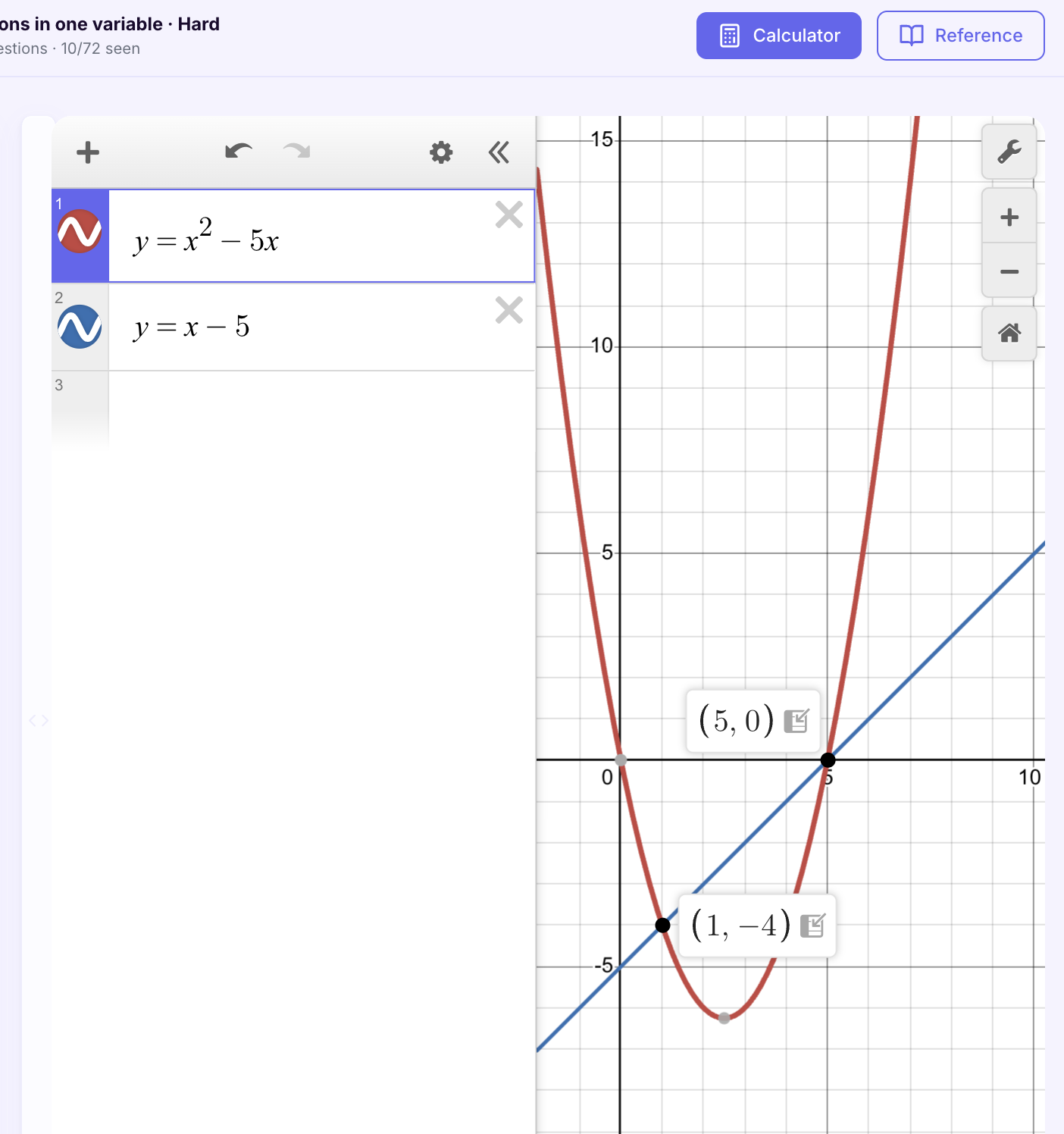
This works for linear systems, quadratic-linear systems, and any pair of equations the SAT throws at you. The question might ask for x, for y, or for x + y. Either way you have both values right there.
2. Find Quadratic Solutions Instantly
Quadratic equations show up constantly on the SAT. Factoring, completing the square, quadratic formula. All of these take time and any step can go wrong.
Or you can just type the equation into Desmos and click the x-intercepts. Those are your solutions.
Here's an example: 3x² - x - 4 = 0. Type it in, and Desmos shows you the solutions right on the graph: x = -1 and x = 1.33333 (which is 4/3).
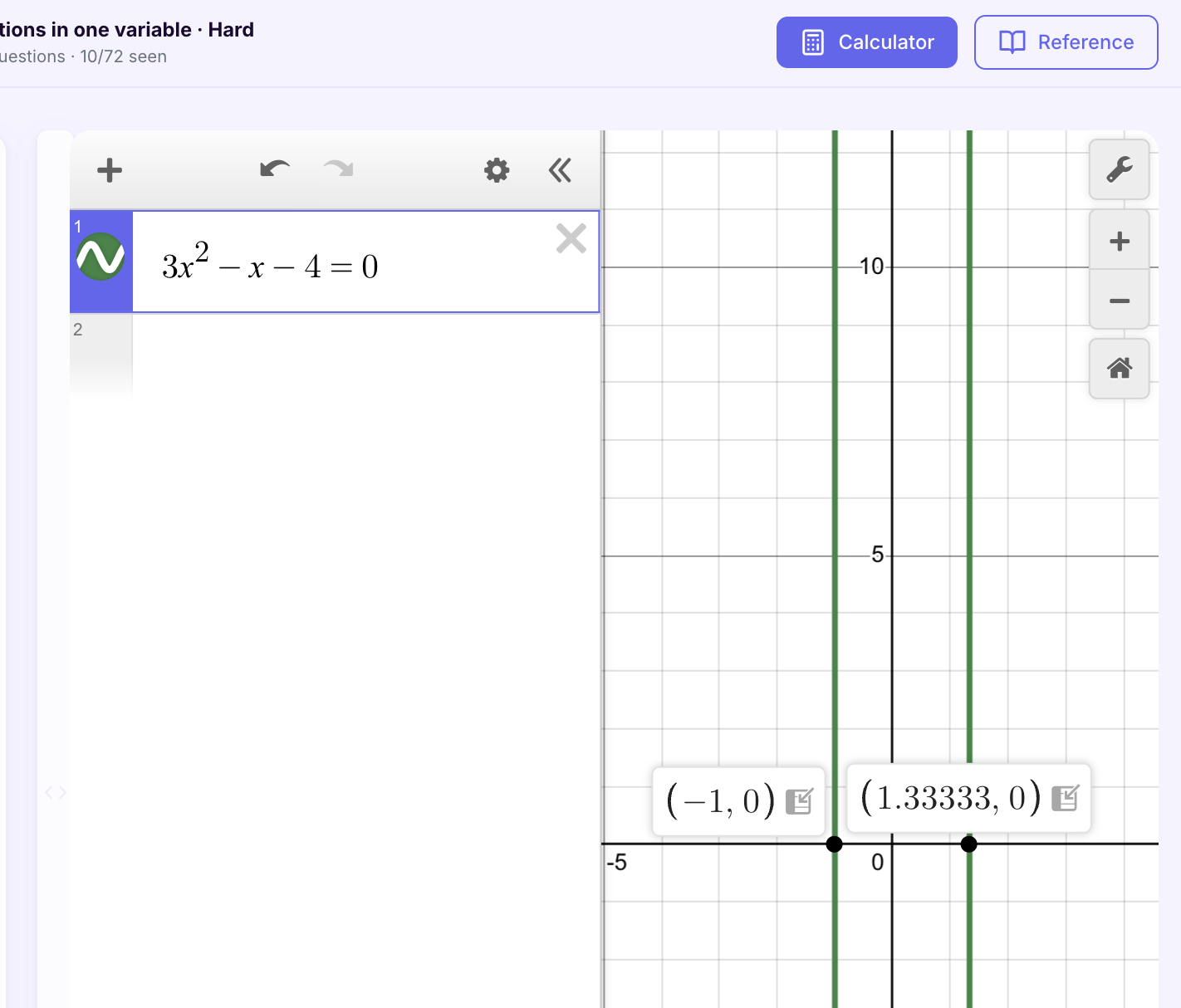
Quick tip: Desmos shows decimal answers but the SAT might give answer choices as fractions. 1.33333 is 4/3. Get comfortable converting between the two.
This also works when the question asks "how many real solutions does this equation have?" Just graph it and count how many times it crosses the x-axis. Zero crossings means no real solutions. One crossing means one. Two means two. No algebra needed.
3. Evaluate Functions and Transformations
The SAT loves function questions. They'll define f(x) and g(x), apply a transformation, and ask you to evaluate something like g(5). Doing this by hand means substituting, simplifying, and hoping you don't drop a negative sign somewhere.
Desmos handles all of it. Define your functions, type in what you want to evaluate, and it gives you the answer.
Here's a real example. f(x) = x² - 2x + 5 and g(x) = f(x - 3) + 2. The question asks for g(5). Instead of manually expanding f(5 - 3) + 2 = f(2) + 2 = (4 - 4 + 5) + 2, just type all three lines into Desmos:
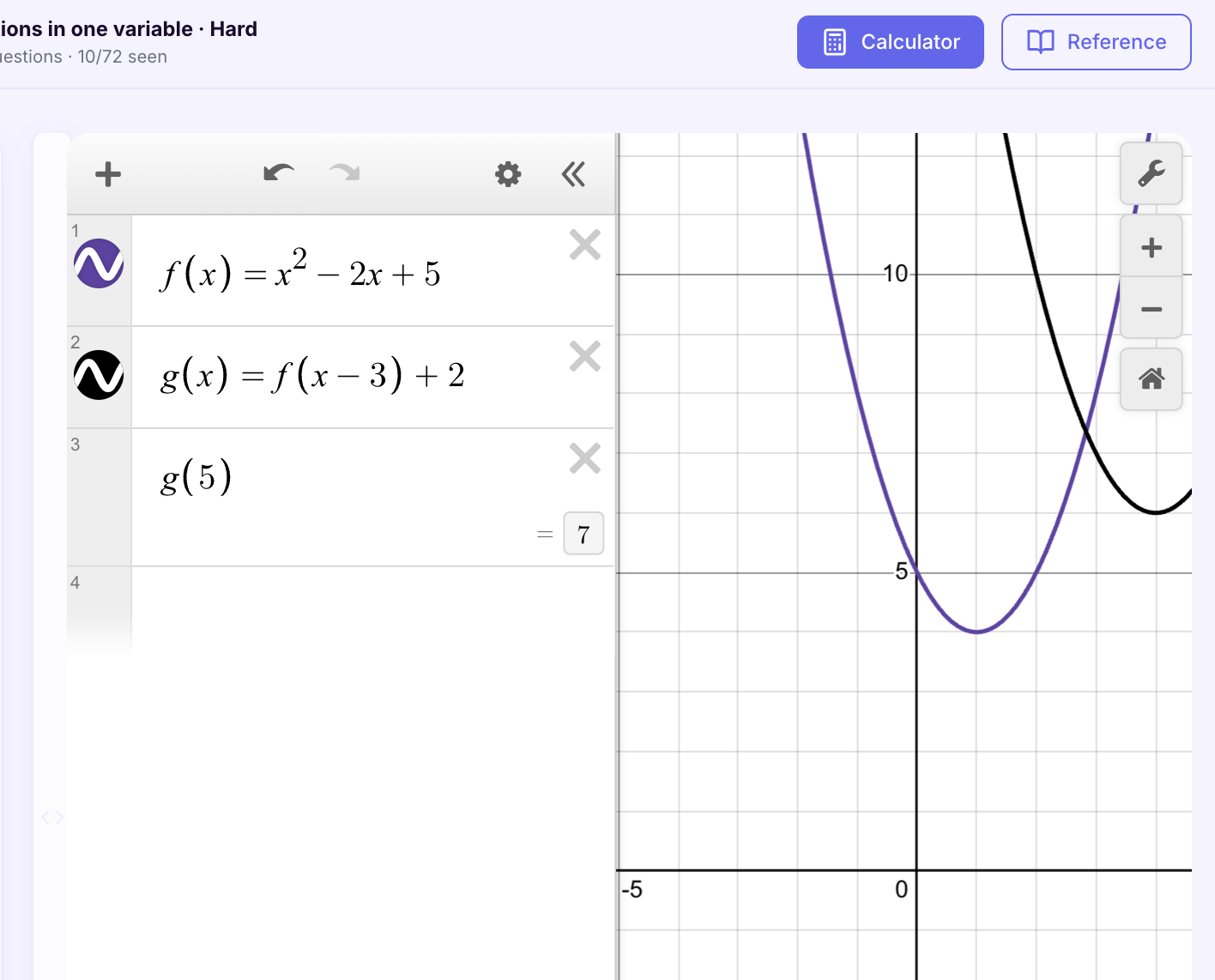
g(5) = 7. Done. No substitution errors, no arithmetic mistakes. And if the question changes to "what is g(3)?" you just change the number in line 3.
This is especially powerful for transformation questions where g(x) is defined as a shift or stretch of f(x). Desmos handles the transformation automatically. You can even see it visually on the graph, the purple curve is f(x) and the black curve is g(x) shifted right 3 and up 2.
4. Use Regression for Data Problems
When the SAT gives you a table of values and asks you to find the equation that models the data, regression is the fastest approach. We wrote a full walkthrough of this technique with a real SAT-style problem, but here's the short version:
Enter the data points into a Desmos table, click "Add Regression," and Desmos gives you the equation. For linear data it spits out y = mx + b with the exact slope and intercept. Match it to the answer choices and you're done.
This technique is especially useful because regression problems on the SAT tend to be time-consuming when done by hand. You'd need to calculate slope from two points, find the y-intercept, and check your work. Desmos does all of it in about 10 seconds.
5. Find the Value of a Constant That Gives Exactly One Solution
The classic hard question: "for what value of k does the system have exactly one solution," usually a line meeting a parabola. By hand it is the discriminant. In Desmos, type the parabola, type the line with the constant left as a letter, and Desmos offers you a slider for it. Drag the slider until the line just touches the curve. The value on the slider is your answer, and the point where they touch shows you the geometry of why.
What to type: y = x^2 + 4x + 7 and y = 2x + k, then click "add slider" for k. If you want the exact value rather than a slider estimate, drag until the two intersection points merge, then confirm with the discriminant by hand. On the test, the slider alone usually lands on a clean integer.
6. Mean, Median and Standard Deviation Without a Formula
Any statistics question that hands you a list of numbers is a one-liner. Desmos accepts lists in square brackets and has the functions built in. Type the list once, then ask for whatever the question wants.
What to type: L = [12, 15, 15, 18, 22, 30], then mean(L), median(L), stdev(L). For "which data set has the larger standard deviation," type both lists and compare the two numbers. No arithmetic, no chance of a slip in the middle. The questions that ask what happens to the mean or median when a value is added or removed are also fastest this way: edit the list and read the new value.
7. Check Which Expression Is Equivalent by Plugging In a Number
"Which of the following is equivalent to" questions with fractions or exponents are built so that algebra by hand takes a minute and one sign slip sends you to a wrong choice. Desmos turns them into a lookup. Define the original expression as a function, define each answer choice as a function, and evaluate them all at one convenient number.
What to type: f(x) = 3/(3x - 4) - 1/(x + 2), then a(x) = 10/((x + 2)(3x - 4)) and so on for each choice, then f(5), a(5). The choice whose value matches is the answer. Pick a number that is not 0 or 1, since those hide differences. Thirty seconds, and it cannot be wrong if you typed the expressions correctly.
8. Circles: Read the Center and Radius Off the Graph
Circle questions on the digital SAT come in two shapes: an equation you have to read the center and radius from, and a point you have to place inside or outside the circle. Desmos graphs both directly. Type the equation as written, even in the ugly expanded form, and the circle appears. Hover the center or read the intercepts for the radius. For "which point does not lie inside," type each point as an ordered pair and look.
What to type: (x - 2)^2 + (y + 3)^2 = 16, then (6, -1), (4, -1), (0, -3). If the equation is given expanded, type it expanded; Desmos does the completing-the-square for you by drawing it.
Do you need to bring a calculator to the SAT?
No. Desmos is built into Bluebook and it is there on every Math question, both modules, with a scientific mode and a graphing mode you can toggle between. Nothing is gated behind bringing your own.
You are still allowed to bring one, and if a handheld is what you are fluent with, bring it. Familiarity beats theory on test day, and there is no downside to having it on the desk. But treat that as a bridge, not a plan. Once you actually learn Desmos, almost nothing on this test is faster on a handheld. Everything above, systems by graphing, quadratic roots by eye, regressions, the constant that gives exactly one solution, is slower on a TI or not possible at all.
Which calculators are allowed on the SAT
College Board's policy, in short. Allowed: graphing calculators without a computer algebra system, scientific calculators, and basic four-function calculators, though a four-function is not much use here.
Not allowed: anything with a computer algebra system, anything with a QWERTY keyboard, anything with wireless, Bluetooth or cellular, anything with a camera or audio or video recording, tablets, laptops, phone calculator apps, pen-input or electronic writing pads, models that use paper tape, and models with an oversized or raised display. Sound has to be off, the device has to be battery powered and handheld, and you cannot share one with another student. Check the current list on College Board's calculator policy page before test day, since models get added and removed.
One practical note: you are responsible for your own working calculator. Nobody at the test center will hand you batteries.
When Not to Use Desmos
Three kinds of questions get slower with the calculator. Interpretation questions, where the answer is a sentence about what the slope or the constant means; there is nothing to graph. Unit and percent word problems, where the work is setting up one line of arithmetic. And any question that is one line of algebra, like solving a single linear equation. Typing those into Desmos costs more time than it saves. The rule: Desmos when the question is a graph, a system, a data set, or a "which value of k"; by hand when it is one line.
Why Most Students Don't Use These Tricks
Schools don't teach Desmos as a problem-solving shortcut because it defeats the purpose of learning algebra. If a teacher showed students that Desmos can solve quadratic equations instantly, they'd never learn the quadratic formula. And learning the math is the whole point of class.
But the SAT is a different game. Nobody cares how you get the answer. There's no partial credit. The only thing that matters is whether you picked the right choice before time ran out. Desmos is the biggest legal advantage most students aren't using.
How to Practice
Knowing these tricks exists isn't enough. You need to practice them until they're automatic. On test day you won't have time to think "oh wait, can I use Desmos for this?" You need to see a system of equations and immediately start typing it into Desmos without hesitation.
Every practice problem on Sigma Prep comes with a video explanation showing the fastest solving method. For most problems that means Desmos. You'll see exactly how a tutor would use it on each problem type so you can build that muscle memory before test day.
Twelve hard question types across the whole section, each solved with the Desmos move where one applies: Hardest SAT Math Questions 2026-27.